SuperRack LiveBox D – Specs and information
Find hardware specifications and information about licensing and software included with the SuperRack LiveBox D.
If you’re looking for information about SuperRack LiveBox M, go here.
Your purchase of SuperRack LiveBox D also includes the SuperRack Performer plugin host and Waves Live bundle.
Out of the box, the SuperRack LiveBox D does not come preauthorized.
To receive the included SuperRack Performer and Waves Live Bundle licenses, register the device to your Waves account. The SuperRack Performer and Waves Live Bundle licenses will be deposited into your Waves account.
Once the licenses are registered, activate the licenses to authorize SuperRack Performer and the Waves Live Bundle:
- Connect the LiveBox to the internet via the network port.
- Launch Waves Central via the desktop icon.
- Log in to your Waves account.
- Select the Licenses page.
- Select Not Activated at the top of the page.
- Choose the license/s you wish to activate. Selected licenses will appear in the list on the right.
- Choose the target device for the activated license/s.
- Click the Activate button.
- Waves Central
- All Waves plugins
- SuperRack Performer
- Dante Controller
- Dante PCIe I/O: Marian Clara E
Please refer to the SuperRack Performer User Guide.
To setup SuperRack LiveBox D or LiveBox M with DiGiCo consoles including remote control, refer to the How to Setup SuperRack LiveBox with DiGiCo Consoles with Remote Control article.
For Dante network support resources, please visit https://www.getdante.com.
Refer to the How to Update SuperRack LiveBox D Clara E Dante to the Latest Version support article to verify that your SuperRack LiveBox D Clara-E Dante driver is up to date.
- Sample Rate: 48 kHz
- Buffer Size: 32
- Clara E ASIO Enabled Channels: 1-128
- Dante Latency: 0.5 milliseconds
- SuperRack Performer supports: 44.1kHz, 48kHz, 88.2kHz & 96 kHz,
- Sample rate can be changed via the Clara E device settings in Dante Controller
- Sample rates above 96kHz are not supported. If a higher sample rate is selected in Dante controller, the system will not function as expected.
The default buffer size is 32 samples. If needed, the buffer size can be changed via the Clara E control panel:
- In SuperRack Performer, go to Setup > Audio Setup. The Clara E interface is already selected. Click the ‘Control Panel’ button.
- On the bottom right corner, adjust the buffer size –
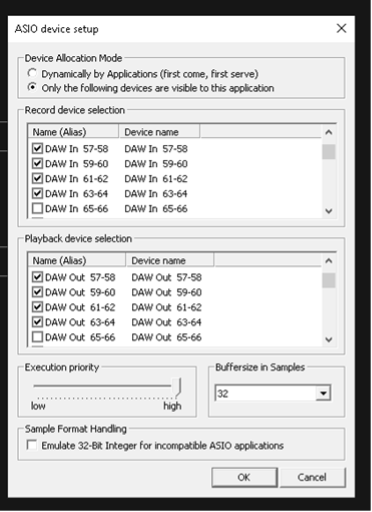 Please note: The minimum buffer size supported when SuperRack and Clara E are running at 88.2/96kHz is 64 samples. If you previously used 32 samples, you will need to manually change it to 64, as explained above.
Make sure that the following settings are configured:
- Device Allocation Mode – we only support “only the following devices are visible to this application.”
- Execution priority – Set to the highest value.
- Sample Format Handling – Uncheck ‘Emulate 32-Bit Integer for incompatible ASIO applications.’
- Please Note: The check marked channels in the control panel will connect to the Clara E ASIO driver in the order of channel selection. For example, if 1-2,3-4,5-6 are checked, then 3-4 is unchecked, the Dante channels 5 and 6 will stream audio to Clara E 3-4 ASIO driver channels.
Using the default settings, there is no need to change the patch configuration in the Clara E control panel to use up to 128 channels, all 128 channels are available.
- The Clara E supports AES67 operation (configured in Dante controller)
- To configure the Dante network via Dante Controller on the LiveBox, an additional cable from the network port of the LiveBox to the Dante switch is required.
- Clicking ‘Control Panel’ in Audio Setup will stop audio. The control panel should only be opened during setup time only and not during a show to not interrupt the audio stream.
- Loading a heavy plugin will result in momentary CPU spike. The CPU consumption will stabilize shorty after.
- Turning on Dugan Speech mixer might result in a momentary CPU spike. The CPU consumption will stabilize shorty after.
- If the AUDIO indicator turns yellow or the CPU meter turns yellow or red, consider raising the buffer or lighten the plugin load.
- Inserting or removing a USB drive may cause audio artifacts, due to some VST3 plugins rescanning devices.
- Motherboard: Gigabyte H610I
- CPU: Core i7-14700
- Memory: 32GB RAM
- Storage: 512 SSD
- OS: Windows 10 LTSC with pre-configured image with optimized settings
- Dante PCIe I/O: Marian Clara E
- 2 x USB 2.0 ports (front)
- 2 x USB 3.2 Gen 1 ports (back)
- 4 x USB 2.0/1.1 ports (back)
- 2 x DisplayPorts
- 1 x HDMI port
- 1 x RJ-45 port.
Need any assistance? contact our Technical Support team.